What should a wedding venue automate first?

A 5-stage guide for saving time without losing the personal touch
Most wedding venues do not need more software ideas. They need a better order of operations.
That is the problem with most automation advice. It tells venues to automate emails, contracts, reminders, payments, tours, floor plans, seating charts, vendor hand-offs, and follow-up without giving them a clear sequence. For a lightly staffed venue team, that kind of advice does not feel helpful. It feels like another project.
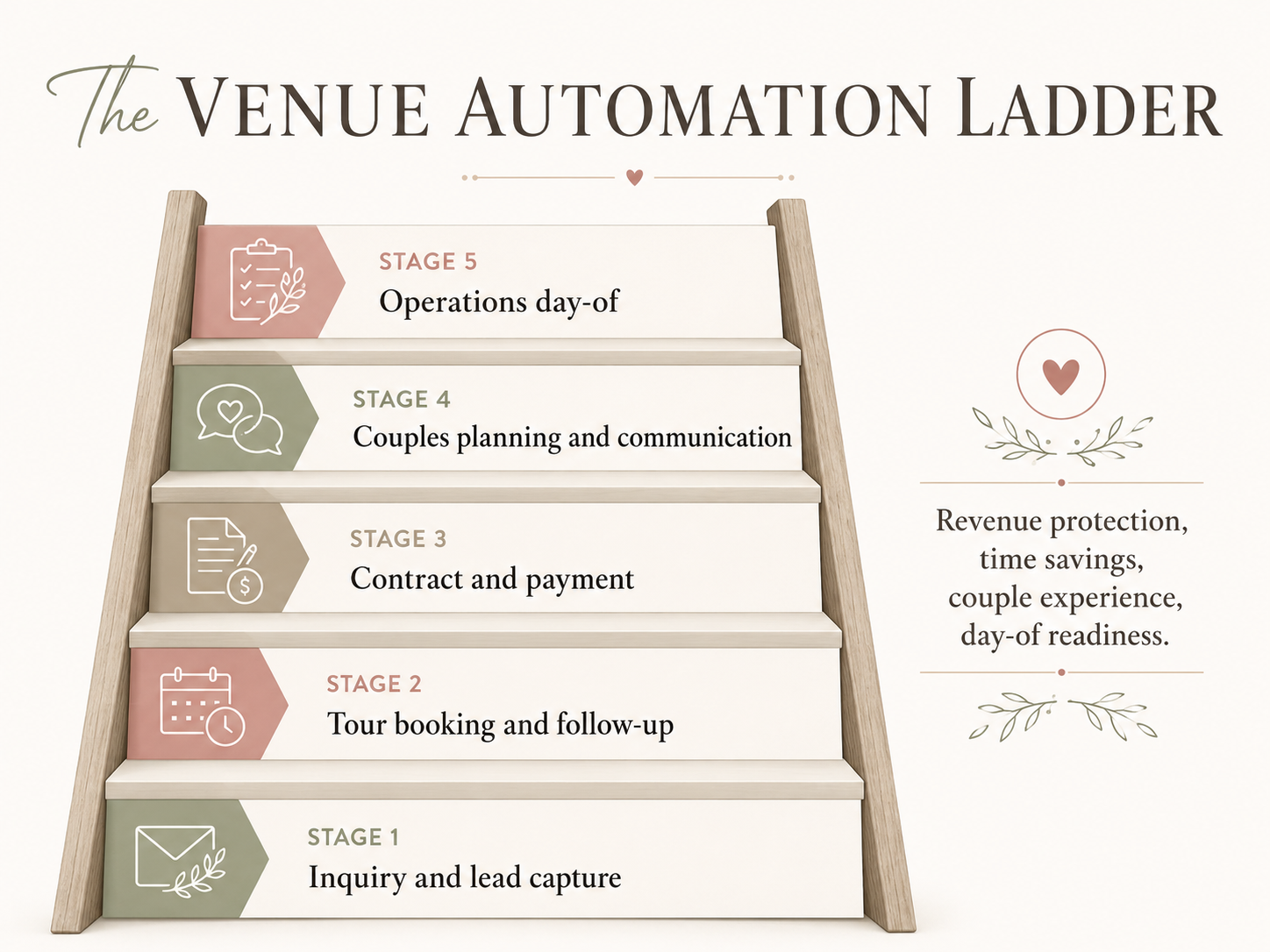
At Seated With Love, we think about venue automation as a ladder. The lower stages protect your revenue. The middle stages save your team time. The upper stages improve the couple experience and prepare your team for the wedding day.
We call it the Venue Automation Ladder:
- Inquiry and lead capture
- Tour booking and follow-up
- Contract and payment
- Couples planning and communication
- Operations day-of
The order matters because wedding venue operations have a natural flow. A couple inquires, books a tour, signs a contract, plans the wedding, then hands off final details for the day itself.
A simple way to remember it: automate in the same order work enters your business.
This guide will help you identify which stage your venue is in, what to automate first, what to leave alone for now, and how to make progress without building a complicated 10-tool stack.

Why most venue automation advice is wrong
Most automation advice starts with tools. That is backwards.
A venue does not need automation because automation sounds modern. A venue needs automation because a real workflow is creating friction. Leads are going unanswered. Tour scheduling takes too many emails. Payment reminders are manual. Couples keep asking for details that already exist somewhere. Final floor plans arrive as screenshots, PDFs, and old email attachments.
Those are not technology problems first. They are operations problems.
When venues skip straight to tools, they often end up with more places to check, more logins to manage, and more confusion for the team. Instead of saving time, the new system becomes another thing someone has to maintain.
The right approach is quieter and more practical. Start with the earliest point in the client journey where time, money, or trust is leaking. Fix that workflow first. Then move to the next stage.
For most venues, the first leak is not hidden deep in operations. It is usually near the beginning: an inquiry that waits too long, a tour that takes too many messages to schedule, or a follow-up that depends on someone remembering to send it.
That is why the ladder starts with the front door of the business before moving into contracts, planning, and day-of operations.
The 5 stages of venue automation
The Venue Automation Ladder gives venues a simple sequence:
- Stage 1: Inquiry and lead capture. Protect the front door of your business.
- Stage 2: Tour booking and follow-up. Turn interest into scheduled visits with less back-and-forth.
- Stage 3: Contract and payment. Make booking clear, professional, and easier to complete.
- Stage 4: Couples planning and communication. Give couples one organized place to plan after booking.
- Stage 5: Operations day-of. Turn final planning details into cleaner hand-off for your team and vendors.
The ladder is not about becoming a fully automated venue. It is about building a calmer operation one layer at a time. A venue that has not solved inquiry response should not start by building a complex day-of workflow. A venue that still tracks contracts manually may not be ready for an advanced planning portal. Each stage becomes more valuable when the stage below it is reliable.
Stage 1: Inquiry and lead capture
The first thing a wedding venue should automate is inquiry and lead capture.
This is the front door of your business. If inquiries are missed, delayed, or scattered across inboxes, every later stage becomes less important. A polished planning portal will not help a couple who never received a response. A perfect day-of workflow will not recover a lead that quietly chose another venue because your team replied too late.
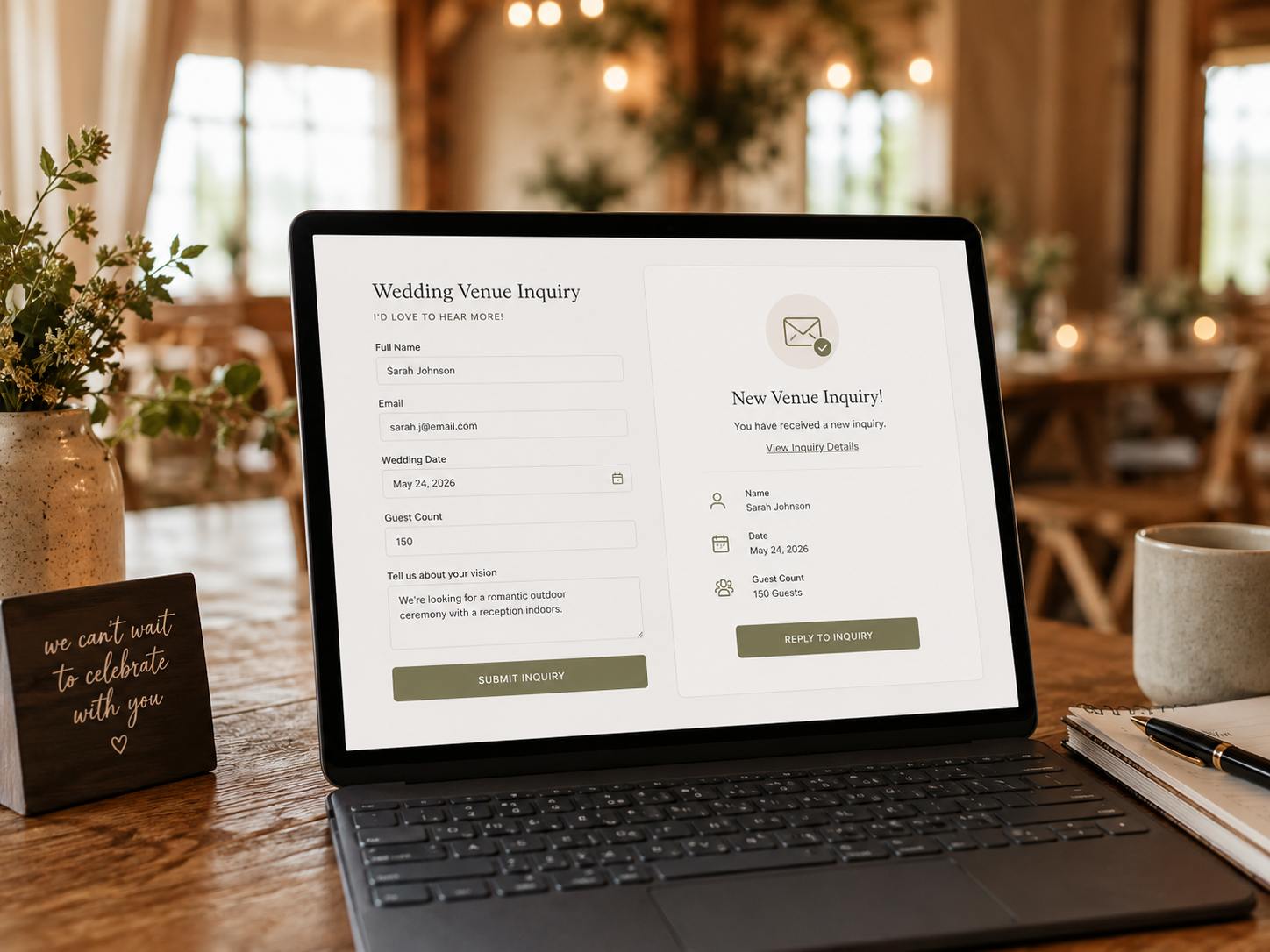
Stage 1 automation should be simple. Your website form should collect the right information, send the inquiry to the right place, notify your team, and immediately reassure the couple that their message was received. The couple should know what happens next, even if your personal reply comes later.
A strong inquiry form usually asks for the basics: names, email, phone number, desired date or season, estimated guest count, ceremony and reception needs, and a short note about what they are looking for. It should not feel like a tax form. At this stage, your goal is to collect enough information to respond well, not make the couple complete your entire sales process before they have spoken with you.
A good automated first response can still sound like your venue:
“Thank you for reaching out. We received your inquiry and are excited to learn more about your celebration! You can book a tour here, or we will follow up personally soon.”
Speed matters here. WeddingPro says most couples expect to hear from vendors within 24 hours, and 70% of couples say vendor responsiveness is one of the top qualities they consider. WeddingPro also encourages vendors to respond while the couple is still actively thinking about the inquiry.
Automate first:
- Inquiry form confirmation
- Internal lead notification
- Lead capture into one shared place
- Auto-reply with a clear next step
- Optional tour booking link
Leave alone for now:
Do not overbuild lead scoring, complex nurture campaigns, or advanced CRM tagging before every inquiry is reliably captured and acknowledged. If your front door is still leaking leads, make it dependable first.
Tools to think about for Stage 1:
Stage 2: Tour booking and follow-up
Once inquiries are reliably captured, the next stage is tour booking and follow-up.
This is where many venues lose momentum. A couple reaches out, your team replies, then the scheduling back-and-forth begins. You send a few available times. They check their calendar. You check yours again. Another inquiry comes in. A day passes. By the time the tour is confirmed, the couple may already be speaking with several other venues.
Stage 2 automation reduces the friction between interest and visit. After submitting an inquiry, the couple can receive a warm confirmation with a tour booking link. Once they choose a time, they can receive directions, parking details, who they will meet, and what they can expect. The day before the tour, they can receive a reminder. After the tour, they can receive a thank-you note with helpful next steps.
The follow-up sequence should be useful, not aggressive. For example:
- Same day: thank them for visiting and share the next step
- Two days later: answer common questions or send package details
- One week later: check whether they need anything else to decide
- Two weeks later: give a polite availability reminder if the date is still open
Tours are one of the highest-leverage moments in the venue funnel because the couple moves from researching to imagining. They stand in the ceremony space. They picture guests entering the room. They ask questions that reveal what matters most to them. Your team gets a chance to build trust in person.
Automate first:
- Calendar scheduling
- Tour confirmation email
- Reminder email or text
- Pre-tour questionnaire
- Post-tour thank-you message
- Follow-up reminders for your team
Leave alone for now:
Do not create a long, generic email drip that treats every couple the same. A couple who toured last weekend should not feel like they were dropped into a marketing machine. Start with a few useful touchpoints that help them decide and help your team stay consistent.
Tools to think about for Stage 2:

Stage 3: Contract and payment
After inquiry and tour follow-up, the next stage is contract and payment.
This is where a lot of manual venue work hides. Contracts are copied from old documents. Package details are adjusted by hand. Deposit due dates are changed one at a time. Payment schedules live in spreadsheets. Signed PDFs sit in email threads. Someone has to check whether the next payment was made before deciding whether to follow up.
Stage 3 automation is not glamorous, but it is one of the fastest ways to save staff time and make your venue feel more professional. This stage can include proposal templates, contract templates, e-signatures, invoice creation, deposit collection, payment schedules, automated reminders, and internal status updates.
Contracts and payments are high-trust moments. Couples want to feel confident that their date is secure, the terms are clear, and the next step is easy. Venues want fewer errors, fewer delays, and fewer awkward reminder messages.
Even a modest number of weddings creates repeated administrative touchpoints: proposal updates, contract edits, signature reminders, invoice checks, deposit confirmations, balance reminders, insurance requests, and internal notes. Multiply that by every couple on your calendar, and small manual tasks become a real operational burden.
Automate first:
- Contract templates by package or event type
- E-signature process
- Deposit invoice
- Payment schedule
- Payment reminders
- Internal booking status
- Signed contract storage
Leave alone for now:
Do not remove human review from pricing, contract terms, special requests, or non-standard packages. Stage 3 automation should make the standard parts repeatable while keeping your team involved where judgment matters.
Tools to think about for Stage 3:
Stage 4: Couples planning and communication
Stage 4 is where your venue’s post-booking experience becomes visible.
Before this point, automation is mostly protecting leads, tours, contracts, and payments. At Stage 4, automation begins shaping how couples feel after they book. This is where the planning journey either stays connected to your venue or starts spreading across disconnected tools your team cannot easily see.
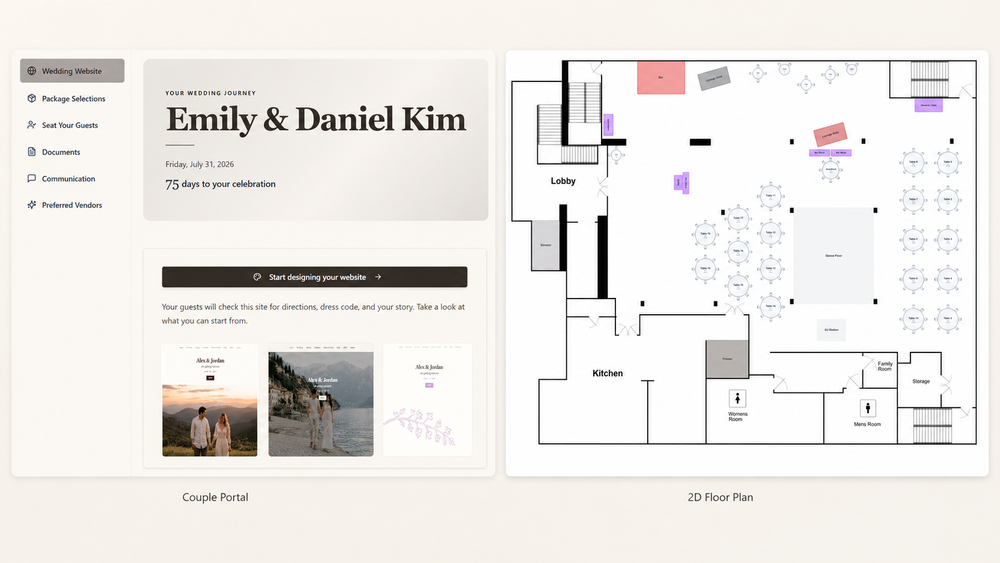
This can include a branded couple portal, planning checklists, guest detail collection, wedding website tools, seating charts, floor plan guidance, package selections, preferred vendor information, registry links, FAQs, reminders, and document hand-off.
This stage matters because most couples do not stop needing your venue after the contract is signed. In many ways, that is when the questions begin. They need to know how the room should be arranged, what their guests need to know, when final counts are due, which package options are available, how seating should work, where to send vendor details, and what information your team needs before the wedding day.
Without a central planning experience, those details spread across emails, texts, spreadsheets, PDFs, outside apps, and wedding websites that have nothing to do with your venue. The couple may still get the wedding planned, but your team has to chase information, and your venue becomes less visible during the digital planning journey.
That is the post-booking gap.
This is where Seated With Love fits naturally. A branded couple portal gives couples one calm place to plan, while your venue gets better visibility into the details it needs. Couples can manage guest information, build a wedding website, organize seating, work from venue-guided floor plans, answer planning questions, review package selections, and access registry tools in one place. Your venue stays central to the experience instead of disappearing after booking.
Stage 4 also creates a new revenue opportunity for venues. Couples already create registries after booking. In most planning workflows, that activity happens outside the venue’s ecosystem and creates no value for the business that helped bring the celebration to life. Seated With Love changes that by sending 30% of eligible registry revenue back to the venue. Couples do not pay more. The registry experience stays inside the branded planning portal, and the venue participates in revenue from activity couples were already going to do.
That distinction matters. The goal is not to make the couple feel sold to. The goal is to make the planning experience more useful while giving the venue a tasteful way to earn from the post-booking journey. When registry tools are presented cleanly inside a helpful portal, they can support the couple experience, keep the venue connected, and create a revenue stream without adding another fee to the couple.
Automate first:
- Planning checklist
- Key venue questions
- Guest count collection
- Package selections
- Floor plan guidance
- Seating chart workflow
- Wedding website setup
- Important reminders
- Registry tools inside the branded portal
Leave alone for now:
Do not try to automate every planning decision. Couples still need guidance, taste, reassurance, and flexibility. Stage 4 should centralize the planning journey and reduce repetitive questions, not make couples feel like they are being pushed through a rigid checklist.
Tool to think about for Stage 4:
Stage 5: Operations day-of
The final stage is day-of operations.
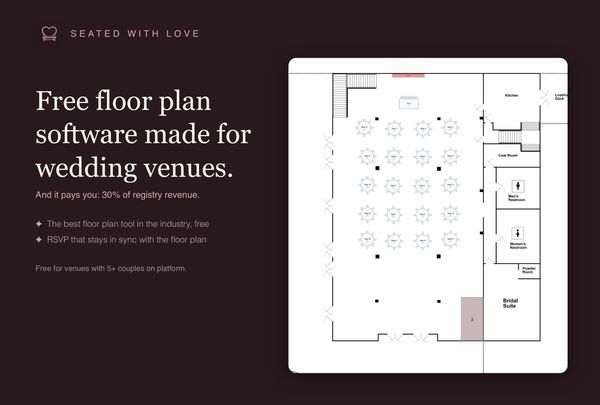
This is where the information collected throughout planning becomes useful for the people responsible for making the event run smoothly. Stage 5 can include final floor plans, seating chart hand-off, vendor arrival details, timeline documents, setup notes, internal task lists, day-of contact sheets, catering notes, rental details, staff assignments, and last-minute change tracking.
This stage matters, but it should usually not be first. Day-of operations depend on the quality of the information collected before the wedding day. If guest counts are buried in emails, floor plans are saved as screenshots, seating charts are updated in separate tools, and package selections are stored in old messages, day-of automation will be hard to trust.
Once your venue has reliable inquiry capture, tour follow-up, booking workflows, and couple planning tools, day-of preparation becomes much easier. Your team can see the latest details. Vendors can receive the right information. Couples do not have to resend answers they already gave. Last-minute changes still happen, but they are easier to manage because the source of truth is clearer.
Automate first:
- Final detail reminders
- Day-of document collection
- Vendor information hand-off
- Floor plan exports
- Seating chart exports
- Internal task lists
- Final guest count visibility
- Staff-ready event summaries
Leave alone for now:
Do not build day-of workflows on top of messy planning data. If the source information is scattered, fix Stage 4 first. A day-of checklist is only useful if the information feeding it is accurate.
Tool to think about for Stage 5:
How to figure out which stage your venue is at
You do not need a formal technology audit to know where to begin. You can usually find your stage by looking for the earliest part of the client journey that still feels inconsistent.
Start with these questions:
- Do all new inquiries land in one reliable place?
- Does every inquiry receive a fast confirmation or clear next step?
- Can couples book a tour without several rounds of back-and-forth?
- Does every toured couple receive consistent follow-up?
- Are contracts, signatures, deposits, and payment reminders mostly templated?
- Do couples have one clear place to find planning tasks, documents, venue questions, floor plan guidance, seating tools, and package details?
- Can your team access final day-of information without digging through email threads?
If you answered no to the first two questions, your venue is in Stage 1. Start with inquiry capture before anything else.
If inquiries are handled but tour scheduling and follow-up are inconsistent, your venue is in Stage 2. Focus on making tours easier to book and easier to follow up on.
If tours are working but contracts and payments still require heavy manual effort, your venue is in Stage 3. Templates, e-signatures, payment schedules, and reminders will likely save meaningful time.
If booking is smooth but couples still rely on scattered emails, spreadsheets, and outside tools during planning, your venue is in Stage 4. This is where a branded planning portal can improve both the couple experience and your team’s visibility.
If the planning process is organized but final hand-off still feels messy, your venue is ready for Stage 5. Focus on day-of readiness, vendor coordination, and final information flow.
Most independent venues are somewhere between Stage 2 and Stage 4. They are capturing leads, booking tours, and signing contracts, but the process often still depends on memory, inboxes, spreadsheets, and manual reminders. That is normal. The goal is not to feel behind. The goal is to choose the next best improvement.
Your next 30-day automation roadmap
The fastest way to make progress is to choose one stage and improve one workflow. Not five workflows. Not a full software migration. One workflow that removes friction for your team or creates a clearer experience for couples.
In week one, identify your stage. Use the self-assessment above and choose the lowest stage where the process is not reliable. Do not skip ahead because a later stage sounds more exciting. If leads are being missed, start with inquiry capture. If tours require too much back-and-forth, start with scheduling. If payment reminders are manual, start there.
In week two, map the current workflow. Write down what happens today, step by step. For example: a couple fills out the website form, the inquiry lands in email, someone replies when they see it, tour times are sent manually, the couple responds, the tour is added to the calendar, a reminder may or may not be sent, and follow-up depends on who remembers. Once the workflow is visible, the weak spots become easier to fix.
In week three, automate the highest-impact step. That might be an instant inquiry confirmation, a tour booking link, a post-tour follow-up template, a contract template, a payment reminder, or a planning questionnaire. Keep the improvement small enough to ship. A simple automation that goes live is more valuable than a perfect system that never leaves the to-do list.
In week four, review what changed. Did your team save time? Did couples receive a clearer next step? Did fewer details fall through? Did the workflow feel more organized? Did the automation still sound like your venue? If the answer is yes, keep it and move to the next improvement. If it feels cold, confusing, or off-brand, revise the message before adding more automation.
Automation should not make your venue feel less personal. It should make your care easier to deliver consistently.
FAQ
What is the first thing a wedding venue should automate?
The first thing a wedding venue should automate is inquiry and lead capture. Every inquiry should land in one reliable place, trigger a fast confirmation, and give the couple a clear next step. This protects the first moment of interest and helps prevent leads from getting lost before a real conversation begins.
How much time does automation save a wedding venue?
The time savings depend on the venue’s volume and current process. The biggest gains usually come from reducing repeated tasks: inquiry confirmations, tour reminders, follow-up emails, contract templates, payment reminders, planning questionnaires, document hand-off, and final detail collection. Even small automations can remove dozens or hundreds of repetitive touchpoints across a wedding season.
Do small wedding venues need automation?
Yes, but small venues need simple, practical automation. A lightly staffed venue does not need a complicated enterprise system. It needs workflows that protect leads, reduce back-and-forth, keep couples organized, and help the team see what needs attention. For small venues, automation is less about replacing people and more about making limited staff time go further.
What tools do wedding venues use for automation?
Wedding venues often use tools for inquiry forms, CRM tracking, calendar scheduling, email templates, e-signatures, invoicing, payment reminders, planning portals, seating charts, floor plans, wedding websites, guest management, package selections, and vendor coordination. The best tool depends on the stage you are trying to improve. Start with the workflow that is currently costing your venue the most time, money, or trust.
How long does it take to automate a wedding venue’s operations?
A full venue operations system can take months to mature, but the first useful automation can often be implemented within 30 days. The best approach is to improve one stage at a time: inquiry capture first, then tour booking and follow-up, then contracts and payments, then couple planning, then day-of operations.
The best automation feels like better hospitality
Wedding venues are relationship businesses. Couples do not book a venue because the workflow is automated. They book because they trust the space, the people, and the experience.
That is why the order matters. Start with the earliest stage where time, money, or trust is leaking. Fix that workflow first. Then move up the ladder.
For many venues, the biggest long-term opportunity is Stage 4: the post-booking planning experience. That is where couples already need guest tools, wedding websites, seating charts, floor plans, package selections, registry links, reminders, and planning guidance. It is also where many venues lose visibility, because planning moves into disconnected tools that do not reflect the venue or support the team.
Seated With Love helps venues close that post-booking gap. Your couples get a branded planning portal that feels connected to your venue. Your team gets the details without the chase. Your venue stays central to the planning journey after booking, while creating new revenue from activity couples already do.
If your venue is ready to give couples a calmer, more organized planning experience, start with the stage you are in now. Then build from there.